Extracting LUKS2 encryption key from a swap partition
Intro
Dear all, recently I’ve been picking up forensic challenges again. A recent trend I observed is that with the LLM apocalypse, the amount of blogs written about basic topics have been declining. Therefore I decided to reincarnate my blog and don’t focus on full writeup, but rather preserving specific topics.
I am by no means a full cryptographic expert, and will not deep dive into that area in this blog
This specific topic was a question in one of the HackTheBox advent challenges. In this challenge, you are handed an E01 hard disk image, which contains the grub partition, an encrypted partition and the swap partition. In FTK it looks like this:
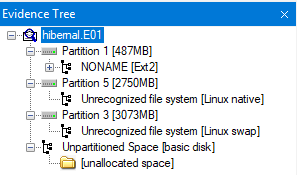
The challenge in question is: What is the AES master key, expressed in hexadecimal?
LUKS2 disk encryption
Linux Unified Key Setup (LUKS) is a disk encryption specification intended for Linux, created in 2004. LUKS2 is the most recent version with a few improvements over LUKS1.
LUKS uses multi layer encryption, where the device itself is encrypted with the master key, and the master key is encrypted with the user key. This is neat, since the user can change their passphrase without a need for a full re-encryption of the device.
Partition 5, our encrypted partition, contains a LUKS header which confirms that we’re dealing with LUKS2 and a key size of 64 (bytes). Which will be 512 bits. The algorithm is aes-xts-plain64. The ‘64’ refers to the total key size (64 bytes > 512 bits). Crucially, XTS splits this into two separate 256-bit keys, meaning we need to look for 2 256-bit keys sitting close to each other rather than 1 big 512-bit key. I had a hard time discovering this, I found this blog (https://www.kingston.com/en/blog/data-security/xts-encryption) ironically explaining it the best.
XTS uses two AES keys. One key is used to perform the AES block encryption; the other is used to encrypt what is known as a “Tweak Value.”
Alternately, if you export the partition, the headers can be dumped with:
sudo cryptsetup luksDump encrypted_partition.raw
(We will use this command later to verify the key). 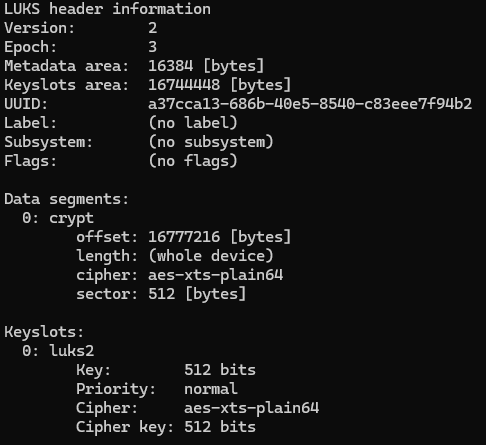
Finding the key
The disk was imaged while in hibernated state. This is beneficial as that means the memory is written to disk and contains our key(s). Those keys are impossible to find by eye in a hex editor, but there are some tools which are very well able to carve this information out, as there are some mathematical pointers.
The tool bulk_extractor by simsong does a great job at this; it is able to find various useful information from a pile of data such as our swap, including AES keys.
We can specify to look specifically for AES keys using the -E aes flag, or leave the flag to see everything the tool finds, which might be useful for anything later in the challenge:
bulk_extractor -E aes -o keys_output swap.bin
This outputs a file called aes_keys.txt.
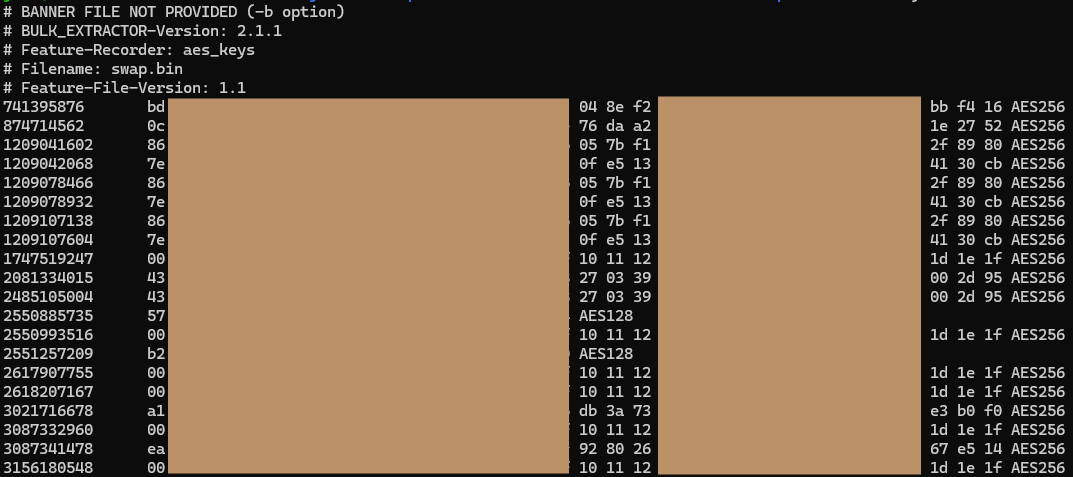
We are looking for two AES256 keys in this output. The keys ending in 80 and cb are prominent, repeating several times after each other. While the list is small enough to brute-force the order, there is actually a logic to it. In memory, these keys are stored contiguously. The key part with the lower memory offset (the smaller number in the first column) is the first half, and the higher offset is the second half. In my output, the key starting with 86 appeared at the lower offset, meaning it comes first.
Verifying the key
By combining these 2 keys (I used the one starting with 86 first) we attempt to create a key file (don’t forget to remove the spaces).
echo -n "86<RestOfTheKey>cb" | xxd -r -p > verify.key
We can try to decrypt the partition and simultaneously check the status. We do this since the luksOpen command does not return anything when the command is successful, only on error:
sudo cryptsetup luksOpen --master-key-file fake.key encrypted_partition.raw evidence && sudo cryptsetup status evidence
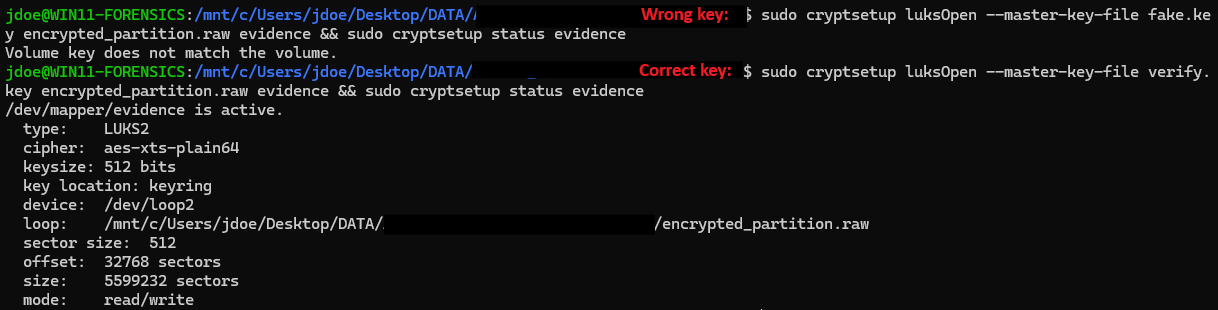
Once a valid volume is opened, view the insides with ls -l /dev/mapper and mount with sudo mount -o ro /dev/mapper/roadrush--vg-root /mnt/tmp and the files are now accessible for further analysis :)

Happy hunting,
Wessel